Posts

How to Fix iPhone 7P Won't Turn On Failure Repair
Image
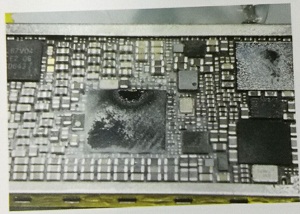
A damaged iPhone 7 Plus need to be repaired, the fault described is that the iPhone 7 Plus won't turn on. First we need to connect it to DC power supply with iPhone lightning cable to test the iPhone charging current, the current jumps around 200mA, not stable. The computer can't identify the iPhone when it is connected, and it doesn't boot.  Nest we need to disassemble iPhone to detect. Use phone opening tools to tear down the iPhone, and then remove the iPhone motherboard. Measure the iPhone motherboard with Fluke 15B+ Digital Multimeter , there is no current, which means no leakage. Trigger it and it shows large current, the current up to 1.9A. Now, apply some rosin on iPhone logic board, and then use QUICK 861DW hot air rework station to heat it, it's turning white. Picture 17-8-1 It's frustrating to see this, did the iPhone main power break down? Open the WUXINJI Dongle to check iPhone bitmap, we found the iPhone Nand flash power also was i...
iPhone Microphone Not Working Problem - Free Guide

Image
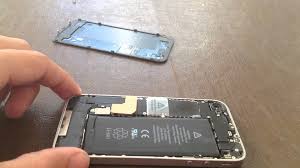
we know that this situation will cause many important mobile activities will be interfered, whether FaceTime chat, voice chat or recording Video, no sound. This is a very annoying problem, and now VIP Pro Shop Team will tell you how to get rid of it. You can Try the following solutions: 1.Test the microphone:  You need to make sure the problem, try recording your voice through the sound recorder and verify if the working condition is fine or not. If needed, check the volume level of your iPhone and keep adjusting it. 2.Using Voice Memos:  Open Voice Memos app that you can find on Home screen . Make sure your fingers aren't covering the microphone. Tap the record icon and start speaking. Now, playback the recording voice. Make sure you can hear your own recording voice clearly. 3.Cleaning the microphone hole:  You need clean the microphone hole and speakers hole. You must gentle to avoid damage the phone. 4.Remove iPhone c...

The Best NAVIPLUS PRO3000S Nand Test Fixture - Do You Know?

Image
Where can I get a user manual? Fortunately, you can get answers here. To be exact, NAVIPLUS PRO3000S is one of the best Nand test fixtures, and here we’ll share some of our e-Guide NAVIPLUS PRO3000S and iphone ipad without removing adapters. 1. NAVIPLUS PRO3000S Nand Flash Programmer First, supply power on it, and then insert the small socket. Second, put iPhone Nand flash on it (please put the good NAND flash and right position) Then touch the screen with a pointy thing, such as the tweezers, but you need to cover the tip of the tweezers with a lid or duct tape, in order to protect the pro 3000s touch screen. Next, choose the function you want, such as flash Nand flash, read or re-write Nand flash, repairing iTunes error, expending iPhone Nand flash and so on. If you feel that the touch is not very sensitive, then please click “Calibrate” to correct it, click on the dots on the screen, repeat this operation several times, and then quit and restart the P...

How to Repair iPhone 7 Backlight Failure Issue

Image
iPhone 7 starts up with a black screen or no display, yet the boot current is normal. Screen replacing also cannot solve the problem. We can draw the conclusion that the logic board backlight circuit broke down.today, the VIP Pro Shop Team will offers a logic board solution regarding the iPhone 7 black screen issue. What's iPhone 7 backlight failure? Such as the iPhone touch screen no display, the screen light is very dim or cannot adjust brightness and so on. Here we can fix iPhone 7 backlight failures.  First of all, please connect WUXINJI Dongle to your computer, and then open it to check iPhone 7 backlight power supply schematic diagram.  According to iPhone schematic diagram, we know that the iPhone backlight boost IC   output three sets of backlight power supply signals, they were PP_LCM_BLANODE (16.5V Cathode Voltage), PP_LCM_BL_CAT1 and PP_LCM_BL_CAT2, these three circuit signals are sent to the display interface via three inductors respectiv...

Get Success in Mobile Phone Repair Business - Core guidance Program

Image
With the development of mobile phone repair business and the market of phone fix tools are getting bigger and bigger, this industry is getting more competitive compared with before. It is difficult to get high profits and success in the mobile phone repair business, and it is not very smooth. How do you try to make your cell phone repair business keeps in a rising profits? Do you try to provide sincere service to your customers to surpass your competitors? In order to get better business in the competitive cell phone repair industry, The VIP Pro Shop Team provides some quick tips in this article, hope it will help someone who wants to build a mobile phone repair business. 1. Choose the right place In any city, you have to learn to choose the best place to take over and succeed in your mobile phone repair business. After a lot of research and investigation of the selection of the site. It is wise to choose a center close to the house and office, and the customer can reac...

How to Fix iPhone 7 Won't Turn On Failure Issue

Image
The iPhone 7 device we got from customer is not turning on. In this piece, we’ll attempt to discuss the various reasons why this could be occurring to your iOS device(s), and some potential workarounds to get you back into the device if it won’t power back on. Disassemble the iPhone 7 and connect DC power supply to have a test, the restart current stuck at 50mA, and the device can not be online.  As we have repair experience on iPhone 6 generation, 50mA current is often related with CPU, U2 and display power preoblems.  Considering the online failure, we replace U2 chip first, the result is the same.  Disassemble the CPU shied cover and observe the iPhone 7 CPU chip under Stereo Microscope, we found the CPU attached well without any track of cracks. 50mA is unable to measure the voltage, so we have to first measure the resistance on the circuit of restart conditions. After the iPhone 7 CPU and NAND are measured, continue to measure clock, reset and ...

Solution for iPhone 6S Plus iTunes error 14 issue

Image
Many users have reflected this situation.There is an iPhone 6S Plus need to be repaired, the fault reflected by iPhone user is that there is no serial number when flash iPhone with iTunes, and the iTunes reports unknown error 14, 4013 and so on. According to the description, we suspect that it's an iPhone Nand flash problem. Connect iPhone to computer with lightning cable, use iTunes to flash iPhone, the iTunes reports that the iPhone "iPhone" could not be restored. An unknown error occurred (14).  Disassemble the iPhone, take out the iPhone motherboard, and then carefully remove the iPhone Nand flash. Check iPhone bitmap on WUXINJI Dongle , and then measure the diode data with multimeter, we found that the resistance value of iPhone Nand flash solder pad M6 Pin is infinitely large.  This pin passes through the R1501 resistor and pulls down, there is no resistance value when measured it with Fluke 15B+ Digital Multimeter , now we're judging tha...